What it is: The best way to explain this thing is that it's an organizing system for GMail communication in a classroom setting. It has tools that make the process of sending out assignments and collecting assignments, from all of the students, multiple classes, multiple artifacts per student, much easier.
It is NOT an online classroom where each student gets to work at his/her own pace. That would be Moodle ... if you want a totally differentiated system that does the teaching and each kid is at a different place, then Classroom isn't going to work well for you.
Type of class it's best for:
My colleagues in the English and History departments are the most satisfied with Classroom because their myriad assignments are typically written paragraphs that could easily overwhelm your in-box if you were to try and have the students just send them to you ... to the tune of 1000 emails a week, or more.
(update: "Ducks to Water - Google Classroom" details the experience of a New Zealand English teacher's use of Classroom)
It's tough for math, however. Symbols are limited. There is Greek Delta for triangle, but you have to use < for angle. Complex notes are impossible - handwritten still works best for taking notes, then scan and send from the school copier. Algebra is possible for me since I'm writing one equation for a problem but the students can't show their work easily. Pre-Caclulus and Calculus are basically a no-go in GDocs. There's easy integration of Desmos and Geogebra, but you have to let go of the need to show work or steps.
The exceptions: Probability and Statistics, and portfolio/explanation/extended answer questions. P/S using Sheets works great. You can send out data ("Make a copy for each student") and the kids each create a presentation with graphs from it. Similarly, "portfolio" problems or the new Common Core explanation-required problems work fairly well because there's more writing and verbiage than math equations.
Bottom line: If your students are using Google Docs to do their work, then Classroom is perfect. I gave the Stats class work that they generated spreadsheets and graphics for: Sheets and Slides came back, sorted, tagged with name, a nice little interface that collects all of the artifacts that are submitted with the assignment (also renames them with assignment name and student name, e.g., "6.2 Histogram - John Smitty 2018").
Bonus: If your students have more than one class using Classroom, then they get a dashboard with assignments and such. They LIKE having everything there.

- Ease of use.
- Every assignment goes to every kid at the same time. Email notification and bright red "Assignment Due" in the interface.
- The assignments that are submitted are definitely submitted.
- Kids appreciate it when multiple teachers use it.
- You can grade right in the list of students' submissions. Open the kid's submitted files, add comments right in the margins, "Return" it if you want improvements, choose a grade.

Problems:
- Typing Algebra.
- Drawing graphs. (Desmos and Geogebra integrate well, but DRAWING is cumbersome)
- Every assignment goes to every kid at the same time. Email notification and bright red "Assignment Due" in the interface. No differentiation.
- No quizzes (yet. They claim to be working on it)
- You can't have a class prepped too far out, certainly not a full course.
- Gradebook is limited and does not integrate with your gradebook program.
Here's a sample assignment:
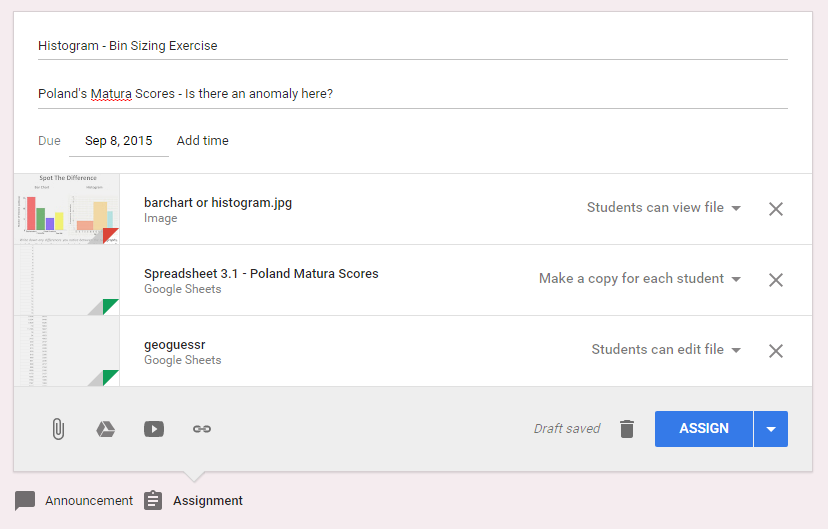
It's got a title and a due date. I included a picture for them to look at (student can view), a spreadsheet will the data that each student will work on and submit later (Make a copy for each student) and an another spreadsheet that all students can edit together. The "Make a copy for each" option allows each student to have their own to work on while the "Students can edit" option lets us all contribute data to the same file. It could be raw data, a GDoc that you're using for class notes, etc.
The paperclip icons at the bottom allow you to attach a file from your computer (uploaded), attach a google doc (doc, sheets, drawing, etc.), a YouTube video link, and a general link.
When you student has completed his work, he goes back to this page and hits the SUBMIT button. Any file that was "Make a copy for Each" is automatically attached, but the student can attach other files, evidence, artifacts, and then submit.
It all gets neatly organized in your GDrive, in a folder creatively called "Classroom", but you will never need to look in there for them.
 |
| Nope, don't care. |

Note: The blue rectangles are just to obscure the students' names for publishing here. The green one covers a student's name as part of the new automatically created filename. Each student's entry can be expanded as I did here to see and open any submitted files. Everything is in my Drive, but I can get to it all here.
Also, to answer the other question asked on Twitter, I feel it's not that difficult to create the same assignment more than once for different sections and this gives me the flexibility of having classes at different points during the year. Not only that, but announcements can be posted to more than one group and can contain PDFs, links, images, etc.
Note: I don't grade them here because I don't want dual-gradebook confusion. I do write comments (ctrl-alt-M) in the documents themselves.
If this works for you, you owe me a beer someday.
There will be a part 2.


 Posts
Posts


You need to stop lumping the capable with the clueless and stop implying that I am just like that apocryphal moron. Sure, you "continually run into" them but you also continually run into capable people, too. We don't hit you in the metaphorical gut in such a memorable way, though. I suffer these fools, too, but I don't want to fire everyone who can't run AutoCAD.
You need to stop conflating your pet peeves with actual problems. Not understanding the difference between the URL box and the Google search box is a minor issue. The only difference, when you come right down to it, is that the one gives Google one more sliver of ad-revenue. Maybe. I'm sure that I could find some equally "silly" thing that you don't know about IE or Chrome.
In education, the answer is many-faceted:
- Free up the tech people to make tech
available to the faculty and to provide training for teachers and students. SOMEONE has to be the go-to guy, looking at various options and deciding which might be worth following. Tech is coming out constantly - you can't expect faculty to succeed with two full-time jobs simultaneously: (1) teach high-school math and (2) discover, evaluate, learn, train on the 1200+ software tools on the 10+ major platforms.
- Introduce tech to the classrooms that works as promoted. Too often, the starry-eyed purchase something that winds up being ignored because every time you go to use it, it fails and you have to have a plan B ready for the 45 minutes you have these kids. The tablets needs to be able to connect to the Internet ... all the time, in every classroom, without a 15 minute delay. By the time I finish taking roll, the tech should be working. If my smartboard crashes every time I use it, I won't count on it. If the tech guy comes in with a wide-screen monitor for a 3:4 aspect ratio projector, you're not going to be able to use one of those two. If the students can't access their Google accounts, you won't get much done. If the school tech guy can't get the filter to work seamlessly, then you will be constantly doing things that are not what you planned.
- Plan for repair and maintenance. If you ask the average person to repair the tech in his room, be sure that he will make some mistakes - it's not just a teacher thing.
- Free up the faculty to develop these new resources. Remove the stigma / penalties for those who try something new and fail the first couple times. If your teachers are afraid for their jobs, they will be ultra-conservative since few want to take a
wild-ass chance on a curriculum revamp with merit-pay and test scores and observances and evaluations on
the line. When parents and administrators and school boards are all questioning a new way of
teaching, few teachers are going to jump at the chance to be the guinea pig. If it has to be perfect the first time, it won't happen at all.
- Research and Published Results. Tech-gurus and bloggers and educational researchers
are consistently contradictory as to the value and efficacy of new (or rehashed) ideas. It would be really nice if you-all could agree on starting school at age 3 or age 7, whether this tech or that tech is best, whether collaborative learning Integrated Math or Singapore Math is best. Figure this shit out for me so I can apply it.
- Free up the money to let this all happen. Tech is expensive. Tech mistakes are expensive too.
- Free up the faculty from union restrictions. Yeah, I said it. In the push to help guarantee fair treatment for all teachers, the NEA and AFT too often negotiate contract compromises that bind faculty or give faculty the sense that going around that provision is tantamount to surrender in a bloody civil war. Occasionally, the faculty need to tell off the Union Rep in order to get the time to receive training that actually helps them. Of course, the school has to be sure that the training actually helps them.
We aren’t asking for much.